
orx-fx
Ready-to-use GPU-based visual effects or filters. Most include orx-parameters annotations so they can be easily controlled via orx-gui.
The provided filters are based on OPENRNDR's
Filter class
All filters provided by orx-fx assume pre-multiplied alpha inputs, which is OPENRNDR's default.
Effects index
Here's a (potentially incomplete) list of the effects provided by orx-fx. Explore the source for an up-to-date list.
Anti-alias
FXAA, fast approximate anti-aliasing.
Blends
Blend filters take two inputs ("source" and "destination"), they are intended to be used in orx-compositor's layer blend. All blend filters are opacity preserving.
Photoshop-style blends
ColorBurnColorDodgeDarkenHardLightLightenMultiplyNormalOverlayScreenAdd, add source and destination inputsSubtract, substract destination color from source color
Porter-Duff blends
SourceIn, Porter-Duff source-in blend, intersect source and destination opacity and keep source colorsSourceOut, Porter-Duff source-out blend, subtract destination from source opacity and keep source colorsSourceAtop, Porter-Duff source-atop blend, uses destination opacity, layers source on top and keeps both colorsDestinationIn, Porter-Duff destination-in blend, intersect source and destination opacity and keep source colorsDestinationOut, Porter-Duff destination-out blend, subtract destination from source opacity and keep destination colorsDestinationAtop, Porter-Duff destination-atop blend, uses source opacity, layers destination on top and keeps both colorsXor, Porter-Duff xor blend, picks colors from input with highest opacity or none with opacities are equal
Various blends
Passthrough, pass source color and opacity.
Blurs
Most blur effects are opacity preserving
ApproximateGaussianBlur, a somewhat faster but less precise implementation ofGaussianBlurBloom, a multi-pass bloom/glow effectBoxBlur, a simple but fast box blurFrameBlurGaussianBlur, a slow but precise Gaussian blurHashBlur, a noisy blur effectLaserBlurLineBlurMipBloomZoomBlur, a directional blur with a zooming effect
Color
ChromaticAberration, a chromatic aberration effect based on RGB color separationColorCorrection, corrections for brightness, contrast, saturation and hueColorLookup, Color LUT filterColorMix, filter implementation of OPENRNDR's color matrix mixingDuotone, maps luminosity to two colors, very similar toLumaMapbut uses LAB color interpolation.DuotoneGradient, a two-point gradient version ofDuotoneInvertLumaMap, maps luminosity to two colorsLumaOpacity, maps luminosity to opacity but retains source colorLumaThreshold, applies a treshold on the input luminosity and maps to two colorsPosterize, a posterize effectSepia, applies a reddish-brown monochrome tint that imitates an old photographSetBackgroundSubtractConstant, subtract a constant color from the source color
Color conversion
OkLabToRgbRgbToOkLab
Distortion
All distortion effects are opacity preserving
BlockRepeat- repeats a single configurable block of the source inputDisplaceBlendFisheyeFluidDistortLensesHorizontalWave- applies a horizontal wave effect on the source inputVerticalWave- applies a vertical wave effect on the source inputPerspectivePlane- applies a planar perspective distortion on the source inputPerturbPolarToRectangularRectangularToPolarStackRepeat- repeats the source input in a stack fashionStretchWavesTapeNoiseTilesVideoGlitch
Dither
ADither- a selection of dithering effectsCMYKHalftone- a configurable CMYK halftoning effectCrosshatch- crosshatching effectLumaHalftone- a halftoning effect based on luminosity
Edges
LumaSobel- A Sobel-kernel based luminosity edge detectorEdgesWork- An edges filter doubling as erosionContour- detects multi-level contours- New:
CannyEdgeDetector
Grain
FilmGrain- adds film-like grain to the source input
Shadow
DropShadow- adds a drop shadow based on the opacity in the input image
Tonemap
Uncharted2Tonemap- implements the Uncharted2 tonemapper
Transform
FlipVertically- flips the source input vertically.
Post extension
The Post extension provides an easy way to apply filters to your drawings. Allocating
and resizing color buffers is all taken care of by Post.
To get additional intermediate color buffers one can access intermediate[x]
fun main() = application {
    configure {
        windowResizable = true
    }
    program {
        extend(Post()) {
            val blur = ApproximateGaussianBlur()
            val add = Add()
            post { input, output ->
                blur.window = 50
                blur.sigma = 50.0
                blur.apply(input, intermediate[0])
                add.apply(arrayOf(input, intermediate[0]), output)
            }
        }
        extend {
            drawer.circle(width / 2.0, height / 2.0, 100.0)
        }
    }
}
Colormap
Colormap filters operate only on the RED color channel. For example depth maps from orx-depth-camera.
They allow selection of min / max value range and applying exponential
shaping curve within this range:
GrayscaleColormap- maps to gray tonesSpectralZucconiColormap- maps to natural light dispersion spectrum as described by Alan Zucconi in the Improving the Rainbow article.TurboColormap- maps to Turbo Colormap according to Turbo, An Improved Rainbow Colormap for Visualization by Google.
Demos
DemoApproximateGaussianBlur01
Demonstrates how to use the [ApproximateGaussianBlur] effect to blur
a colorBuffer, in this case, an image loaded from disk.
Notice the use of createEquivalent(), which creates a new colorBuffer
with the same size and properties as a source colorBuffer.
DemoBlur01
Demonstrates 9 different blur effects. The program draws two moving circles into a [RenderTarget], then applies various blurs drawing them in 3 columns and 3 rows.
Each type of blur has different parameters. Not all parameters are demonstrated.

DemoCannyEdgeDetector01
Demonstrates the [CannyEdgeDetector] effect applied to a loaded color photograph.

DemoColorDuotone01
This demo shows how to use the [Duotone] filter,
toggling the labInterpolation parameter every second on and off.
The foregroundColor and backgroundColor parameters are
left to their defaults.

DemoColorDuotoneGradient01
The [DuotoneGradient] effect combines the Duotone effect and a linear gradient: two duotone colors are applied on one part of the image, and those colors are interpolated to two other colors, applied in a different part of the image.
The rotation parameter lets us specify in which direction
the interpolation happens (vertical, horizontal, or something else).

DemoColormapGrayscale
The [GrayscaleColormap] uses the red channel of a colorBuffer
to produce a gray scale image. The curve parameter is used as
an exponent to bias the result up or down. 1.0 produces a linear
transformation.

DemoColormapSpectralZucconi
Demonstrates the [SpectralZucconiColormap], which maps values of the RED color channel to the natural light dispersion spectrum as described by Alan Zucconi in his Improving the Rainbow article.

DemoColormapTurbo
Demonstrates the use of the [TurboColormap] effect, which maps values of the RED color channel to Turbo Colormap according to Turbo, An Improved Rainbow Colormap for Visualization by Google.

DemoColorPosterize01
Demonstration of the [Posterize] effect to reduce the number of colors present in an image.

DemoCompositeFilter01
Advanced demonstration of composite filters, created by chaining
several filters together using the .then() operator.
The demo applies a [FilmGrain] effect and a [DirectionalBlur] effect twice with different parameters.
The [DirectionalBlur] requires a color buffer to define the displacement
directions. In this program, the direction color buffer is populated by writing
into its shadow property pixel by pixel.
Notice the use of frameCount and seconds to animate the effects.
The composite effect is installed as a post-processing effect
using extend(Post()), so anything drawn in following extend
blocks is affected by it.

DemoContour01
Demonstrates the [Contour] filter. @author Edwin Jakobs
This demo creates a grid of 2x2 to draw a loaded image four times, each using the [Contour] effect with different parameters.
actions is a variable containing a list of 4 functions.
Each of these functions sets the effect parameters to different values.
The 4 grid cells and the 4 actions are used in pairs: first the action is called to set the effect parameters, the effect is applied, and the result is drawn in a cell.

DemoDirectionalBlur01
Demonstrates how to use [DirectionalBlur] by creating a direction
ColorBuffer in which the red and green components of the pixels point
in various directions where to sample pixels from. All the pixel colors
of the ColorBuffer are set one by one using two for loops.
Note the FLOAT32 color type of the buffer to allow for negative values, so sampling can happen from every direction.
Every 60 animation frames the centerWindow property is toggled
between true and false to demonstrate how the result changes.

DemoDirectionalDisplace01
Demonstrate how to use [DirectionalDisplace].
The direction map is populated using drawImage instead of
pixel by pixel. A grid of circles is drawn, each circle with a
color based on simplex noise. The R and G channels of the colors
control the direction of the sampling. By animating the sampling
distance the result oscillates between no-effect and a noticeable one.
DemoDirectionalDisplace02
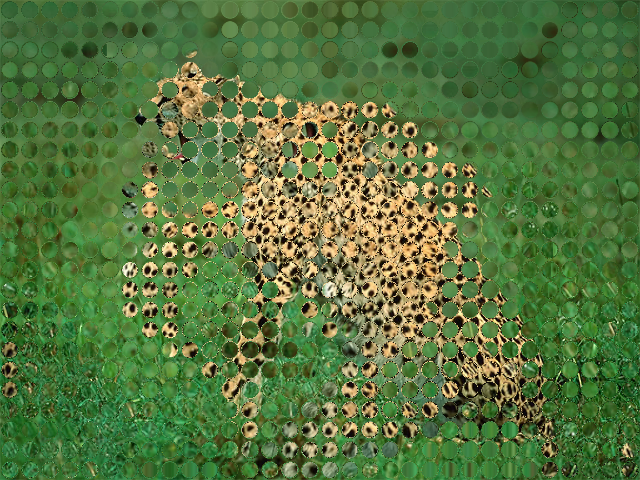
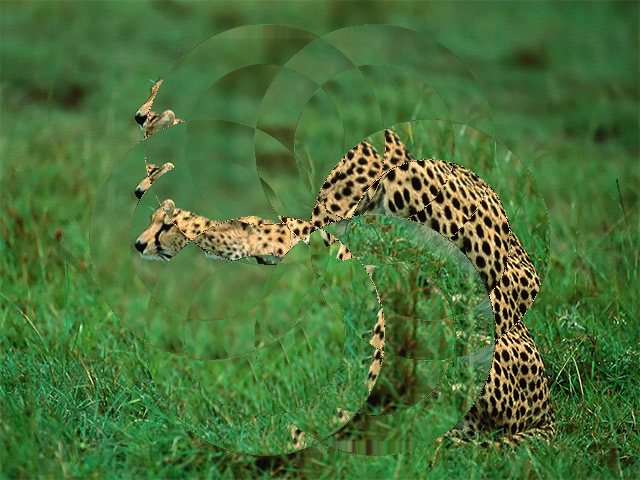
Demonstrate how to use [DirectionalDisplace].
The program draws 12 overlapping translucent circles on the
direction color buffer to produce new color combinations
on the overlapping areas. Those colors specify where the
DirectionalDisplace effect will sample pixels from.
DemoDistortLenses01
Demonstrates the [Lenses] effect, which by default subdivides a color buffer
in 8 columns and 6 rows, and displaces the source texture inside each rectangle.
Try experimenting with some of the other parameters, like distort.
You can even animate them.

DemoDitherLumaHalftone01
Demonstrates the [LumaHalftone] effect and moste of its parameters.
The invert parameter toggles between true and false once per second.
The phase0 and phase1 parameters depend on seconds, which makes
the pattern wobble slowly.

DemoFluidDistort01
Demonstrates [FluidDistort], a fluid simulation real time effect. All pixels are slowly displaced in a turbulent manner as if they were a gas or a liquid.

DemoOkLab01
This demonstrates converting a [ColorBuffer] from and to (OK)LAB color space using the [RgbToOkLab] and [OkLabToRgb] filters. The (OK)Lab representation is signed and requires a floating point representation.

DemoPost01
Demonstrates how to create an extend block to apply a post-processing effect.
The effect is an [ApproximateGaussianBlur] and its sigma parameter
is animated. The Blur effect is combined with whatever the user draws
in the regular extend block using the Add filter, resulting in
an additive composition.
This demo also shows how to make a program window resizable.

DemoSpectralBlend01
Demonstration of how to use the [BlendSpectral] filter to combine two images, using this pigment-simulation color mixing approach.
The program:
- generates two images
- blurs one of them
- creates and draws a checkers-pattern as the background
- mixes and draws both images
The fill factor, which controls how the top and the bottom colors are mixed, is animated.
The clip parameter is also animated and toggles every 6 seconds.
