orx-image-fit
Draws an image ensuring it fits or covers the specified Rectangle.
Similar to CSS object-fit (https://developer.mozilla.org/en-US/docs/Web/CSS/object-fit)
orx-image-fit provides the Drawer.imageFit extension function.
Usage
drawer.imageFit(
  img: ColorBuffer,
  x: Double, y: Double, w: Double, h: Double,
  horizontalPosition: Double,
  verticalPosition: Double,
  fitMethod: FitMethod)
or
drawer.imageFit(
  img: ColorBuffer,
  bounds: Rectangle,
  horizontalPosition: Double,
  verticalPosition: Double,
  fitMethod: FitMethod)
img: the image to drawx,y,w,horbounds: the target area where to draw the imagefitMethod:FitMethod.Contain: fitsimgin the target area. If the aspect ratio ofimgandboundsdiffer it leaves blank horizontal or vertical margins to avoid deforming the image.FitMethod.Cover: covers the target area. . If the aspect ratio ofimgandboundsdiffer part of the image will be cropped away.FitMethod.Fill: deforms the image to exactly match the target area.FitMethod.None: draws the image on the target area without scaling it.
horizontalPositionandverticalPosition: controls which part of the image is visible (Cover,None) or the alignment of the image (Contain).horizontalPosition:-1.0= left,0.0= center,1.0= right.verticalPosition:-1.0= top,0.0= center,1.0= bottom.
Examples
A quick example that fits an image to the window rectangle with a 10 pixel margin. By default
imageFit uses the cover mode, which fills the target rectangle with an image.
fun main() = application {
    program {
        val image = loadImage("data/images/pm5544.png")
        extend {
            drawer.imageFit(image, 10.0, 10.0, width - 20.0, height - 20.0)
        }
    }
}
or
fun main() = application {
    program {
        val image = loadImage("data/images/pm5544.png")
        extend {
            drawer.imageFit(image, drawer.bounds.offsetEdges(-10.0))
        }
    }
}
Demos
DemoImageFit01
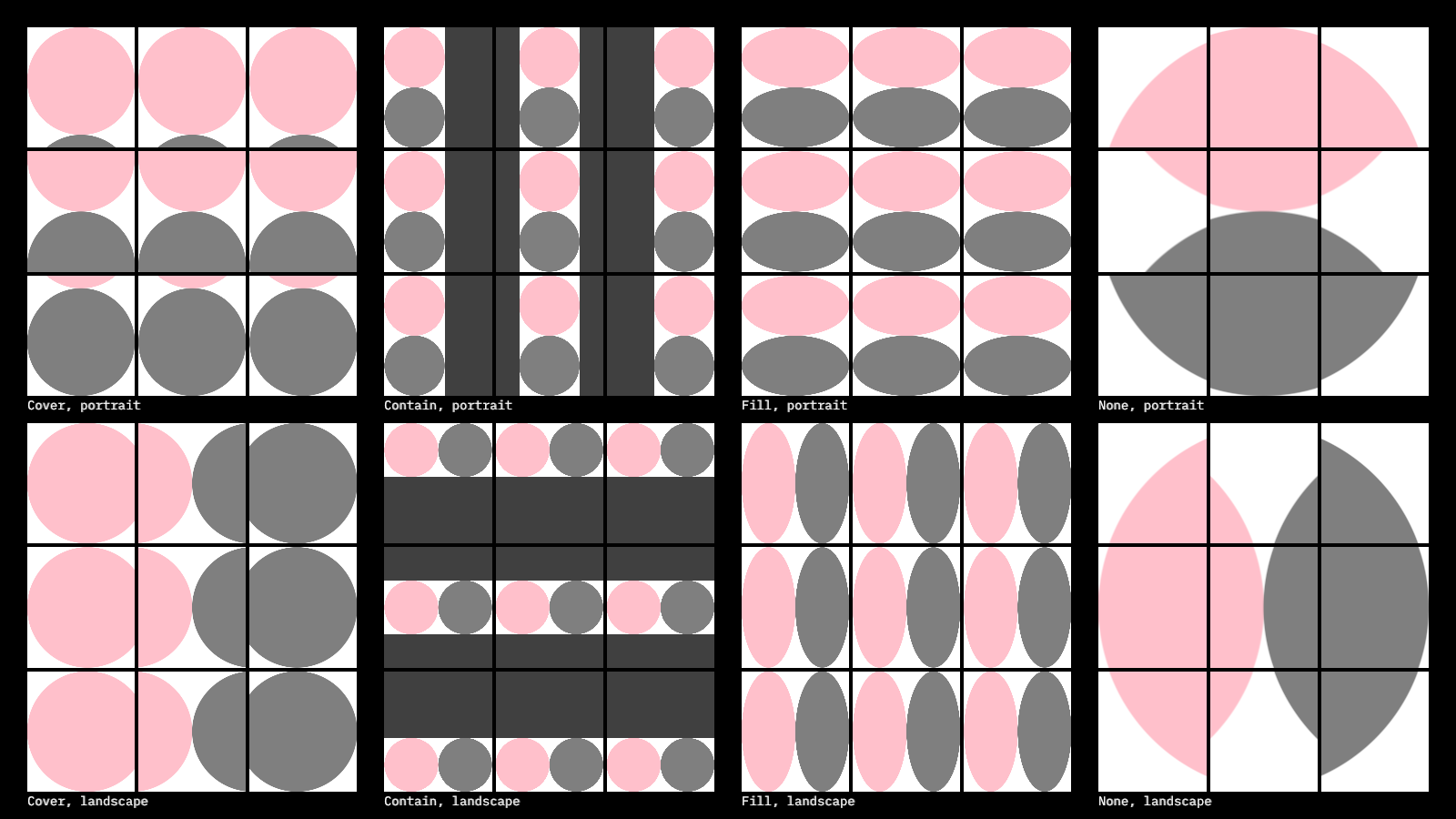
This program uses drawer.imageFit() to draw images using nested grid layout.
The main grid features 4 columns for the Cover, Contain, Fill and None fit methods,
and two rows for portrait and landscape images.
Each of those 8 cells feature a 3x3 grid, with cells combining left, center and right alignment
with top, center and bottom alignment.
The image drawn in each cell is a simple image with a white background and two touching circles: a pink one and a gray one. In some of the cells part of this image is cropped out (due to the fit method used). In other cells the image does not fully cover the available area, revealing a dark gray background.
DemoImageFitSub01
Demonstrates the imageFitSub() method, which allows specifying not only a target Rectangle,
but also a source Rectangle, which is used to set the area of the original image we want to fit
into the target.
The program also demonstrates the Rectangle.uniformSub method, which returns a random sub-rectangle
taking into consideration the minimum and maximum width and height arguments.
Notice the trick used to generate unique random results changing only once per second by using the current seconds as an integer seed.