
458 lines
16 KiB
Markdown
458 lines
16 KiB
Markdown
# orx-fx
|
|
|
|
Ready-to-use GPU-based visual effects or filters. Most include
|
|
[orx-parameters](https://github.com/openrndr/orx/tree/master/orx-parameters) annotations
|
|
so they can be easily controlled via orx-gui.
|
|
|
|
The provided filters are based on OPENRNDR's
|
|
[`Filter` class](https://api.openrndr.org/openrndr-draw/org.openrndr.draw/-filter/index.html)
|
|
|
|
All filters provided by orx-fx assume pre-multiplied alpha inputs, which is OPENRNDR's default.
|
|
|
|
## Effects index
|
|
|
|
Here's a (potentially incomplete) list of the effects provided by orx-fx. Explore [the source](https://github.com/openrndr/orx/tree/master/orx-fx/src/commonMain/kotlin) for an up-to-date list.
|
|
|
|
### Anti-alias
|
|
|
|
- `FXAA`, fast approximate anti-aliasing.
|
|
|
|
### Blends
|
|
|
|
Blend filters take two inputs ("source" and "destination"), they are intended to be used in `orx-compositor`'s layer blend. All blend filters are opacity preserving.
|
|
|
|
#### Photoshop-style blends
|
|
|
|
- `ColorBurn`
|
|
- `ColorDodge`
|
|
- `Darken`
|
|
- `HardLight`
|
|
- `Lighten`
|
|
- `Multiply`
|
|
- `Normal`
|
|
- `Overlay`
|
|
- `Screen`
|
|
- `Add`, add source and destination inputs
|
|
- `Subtract`, substract destination color from source color
|
|
|
|
#### Porter-Duff blends
|
|
|
|
- `SourceIn`, Porter-Duff source-in blend, intersect source and destination opacity and keep source colors
|
|
- `SourceOut`, Porter-Duff source-out blend, subtract destination from source opacity and keep source colors
|
|
- `SourceAtop`, Porter-Duff source-atop blend, uses destination opacity, layers source on top and keeps both colors
|
|
- `DestinationIn`, Porter-Duff destination-in blend, intersect source and destination opacity and keep source colors
|
|
- `DestinationOut`, Porter-Duff destination-out blend, subtract destination from source opacity and keep destination colors
|
|
- `DestinationAtop`, Porter-Duff destination-atop blend, uses source opacity, layers destination on top and keeps both colors
|
|
- `Xor`, Porter-Duff xor blend, picks colors from input with highest opacity or none with opacities are equal
|
|
|
|
#### Various blends
|
|
|
|
- `Passthrough`, pass source color and opacity.
|
|
|
|
### Blurs
|
|
|
|
Most blur effects are opacity preserving
|
|
|
|
- `ApproximateGaussianBlur`, a somewhat faster but less precise implementation of `GaussianBlur`
|
|
- `Bloom`, a multi-pass bloom/glow effect
|
|
- `BoxBlur`, a simple but fast box blur
|
|
- `FrameBlur`
|
|
- `GaussianBlur`, a slow but precise Gaussian blur
|
|
- `HashBlur`, a noisy blur effect
|
|
- `LaserBlur`
|
|
- `LineBlur`
|
|
- `MipBloom`
|
|
- `ZoomBlur`, a directional blur with a zooming effect
|
|
|
|
|
|
### Color
|
|
|
|
- `ChromaticAberration`, a chromatic aberration effect based on RGB color separation
|
|
- `ColorCorrection`, corrections for brightness, contrast, saturation and hue
|
|
- `ColorLookup`, Color LUT filter
|
|
- `ColorMix`, filter implementation of OPENRNDR's color matrix mixing
|
|
- `Duotone`, maps luminosity to two colors, very similar to `LumaMap` but uses LAB color interpolation.
|
|
- `DuotoneGradient`, a two-point gradient version of `Duotone`
|
|
- `Invert`
|
|
- `LumaMap`, maps luminosity to two colors
|
|
- `LumaOpacity`, maps luminosity to opacity but retains source color
|
|
- `LumaThreshold`, applies a treshold on the input luminosity and maps to two colors
|
|
- `Posterize`, a posterize effect
|
|
- `Sepia`, applies a reddish-brown monochrome tint that imitates an old photograph
|
|
- `SetBackground`
|
|
- `SubtractConstant`, subtract a constant color from the source color
|
|
|
|
### Color conversion
|
|
|
|
- `OkLabToRgb`
|
|
- `RgbToOkLab`
|
|
|
|
### Distortion
|
|
|
|
All distortion effects are opacity preserving
|
|
|
|
- `BlockRepeat` - repeats a single configurable block of the source input
|
|
- `DisplaceBlend`
|
|
- `Fisheye`
|
|
- `FluidDistort`
|
|
- `Lenses`
|
|
- `HorizontalWave` - applies a horizontal wave effect on the source input
|
|
- `VerticalWave` - applies a vertical wave effect on the source input
|
|
- `PerspectivePlane` - applies a planar perspective distortion on the source input
|
|
- `Perturb`
|
|
- `PolarToRectangular`
|
|
- `RectangularToPolar`
|
|
- `StackRepeat` - repeats the source input in a stack fashion
|
|
- `StretchWaves`
|
|
- `TapeNoise`
|
|
- `Tiles`
|
|
- `VideoGlitch`
|
|
|
|
### Dither
|
|
|
|
- `ADither` - a selection of dithering effects
|
|
- `CMYKHalftone` - a configurable CMYK halftoning effect
|
|
- `Crosshatch` - crosshatching effect
|
|
- `LumaHalftone` - a halftoning effect based on luminosity
|
|
|
|
### Edges
|
|
|
|
- `LumaSobel` - A Sobel-kernel based luminosity edge detector
|
|
- `EdgesWork` - An edges filter doubling as erosion
|
|
- `Contour` - detects multi-level contours
|
|
- New: `CannyEdgeDetector`
|
|
|
|
### Grain
|
|
|
|
- `FilmGrain` - adds film-like grain to the source input
|
|
|
|
### Shadow
|
|
|
|
- `DropShadow` - adds a drop shadow based on the opacity in the input image
|
|
|
|
### Tonemap
|
|
|
|
- `Uncharted2Tonemap` - implements the Uncharted2 tonemapper
|
|
|
|
### Transform
|
|
|
|
- `FlipVertically` - flips the source input vertically.
|
|
|
|
## `Post` extension
|
|
|
|
The `Post` extension provides an easy way to apply filters to your drawings. Allocating
|
|
and resizing color buffers is all taken care of by `Post`.
|
|
|
|
To get additional intermediate color buffers one can access `intermediate[x]`
|
|
```kotlin
|
|
fun main() = application {
|
|
configure {
|
|
windowResizable = true
|
|
}
|
|
program {
|
|
extend(Post()) {
|
|
val blur = ApproximateGaussianBlur()
|
|
val add = Add()
|
|
post { input, output ->
|
|
blur.window = 50
|
|
blur.sigma = 50.0
|
|
blur.apply(input, intermediate[0])
|
|
add.apply(arrayOf(input, intermediate[0]), output)
|
|
}
|
|
}
|
|
extend {
|
|
drawer.circle(width / 2.0, height / 2.0, 100.0)
|
|
}
|
|
}
|
|
}
|
|
```
|
|
|
|
### Colormap
|
|
|
|
Colormap filters operate only on the RED color channel. For example
|
|
depth maps from
|
|
[orx-depth-camera](https://github.com/openrndr/orx/tree/master/orx-depth-camera).
|
|
|
|
They allow selection of `min` / `max` value range and applying exponential
|
|
shaping `curve` within this range:
|
|
|
|
- `GrayscaleColormap` - maps to gray tones
|
|
- `SpectralZucconiColormap` - maps to natural light dispersion spectrum as described
|
|
by Alan Zucconi in the
|
|
[Improving the Rainbow](https://www.alanzucconi.com/2017/07/15/improving-the-rainbow/)
|
|
article.
|
|
- `TurboColormap` - maps to Turbo Colormap according to
|
|
[Turbo, An Improved Rainbow Colormap for Visualization](https://ai.googleblog.com/2019/08/turbo-improved-rainbow-colormap-for.html)
|
|
by Google.
|
|
|
|
|
|
|
|
<!-- __demos__ >
|
|
# Demos
|
|
[DemoFluidDistort01Kt](src/demo/kotlin/DemoFluidDistort01Kt.kt
|
|
`, which creates a new `colorBuffer`
|
|
with the same size and properties as a source `colorBuffer`.
|
|
|
|
|
|
|
|
|
|
[source code](src/jvmDemo/kotlin/DemoApproximateGaussianBlur01.kt)
|
|
|
|
### DemoBlur01
|
|
|
|
Demonstrates 9 different blur effects.
|
|
The program draws two moving circles into a [RenderTarget],
|
|
then applies various blurs drawing them in 3 columns and 3 rows.
|
|
|
|
Each type of blur has different parameters.
|
|
Not all parameters are demonstrated.
|
|
|
|

|
|
|
|
[source code](src/jvmDemo/kotlin/DemoBlur01.kt)
|
|
|
|
### DemoCannyEdgeDetector01
|
|
|
|
Demonstrates the [CannyEdgeDetector] effect applied to a loaded
|
|
color photograph.
|
|
|
|

|
|
|
|
[source code](src/jvmDemo/kotlin/DemoCannyEdgeDetector01.kt)
|
|
|
|
### DemoColorDuotone01
|
|
|
|
This demo shows how to use the [Duotone] filter,
|
|
toggling the `labInterpolation` parameter every second on and off.
|
|
|
|
The `foregroundColor` and `backgroundColor` parameters are
|
|
left to their defaults.
|
|
|
|

|
|
|
|
[source code](src/jvmDemo/kotlin/DemoColorDuotone01.kt)
|
|
|
|
### DemoColorDuotoneGradient01
|
|
|
|
The [DuotoneGradient] effect combines the Duotone effect
|
|
and a linear gradient: two duotone colors are applied on
|
|
one part of the image, and those colors are interpolated
|
|
to two other colors, applied in a different part of the image.
|
|
|
|
The `rotation` parameter lets us specify in which direction
|
|
the interpolation happens (vertical, horizontal, or something else).
|
|
|
|

|
|
|
|
[source code](src/jvmDemo/kotlin/DemoColorDuotoneGradient01.kt)
|
|
|
|
### DemoColormapGrayscale
|
|
|
|
The [GrayscaleColormap] uses the red channel of a colorBuffer
|
|
to produce a gray scale image. The `curve` parameter is used as
|
|
an exponent to bias the result up or down. 1.0 produces a linear
|
|
transformation.
|
|
|
|

|
|
|
|
[source code](src/jvmDemo/kotlin/DemoColormapGrayscale.kt)
|
|
|
|
### DemoColormapSpectralZucconi
|
|
|
|
Demonstrates the [SpectralZucconiColormap], which
|
|
maps values of the RED color channel to the natural light dispersion
|
|
spectrum as described by Alan Zucconi in his
|
|
[Improving the Rainbow](https://www.alanzucconi.com/2017/07/15/improving-the-rainbow/)
|
|
article.
|
|
|
|

|
|
|
|
[source code](src/jvmDemo/kotlin/DemoColormapSpectralZucconi.kt)
|
|
|
|
### DemoColormapTurbo
|
|
|
|
Demonstrates the use of the [TurboColormap] effect, which
|
|
maps values of the RED color channel to Turbo Colormap according to
|
|
[Turbo, An Improved Rainbow Colormap for Visualization](https://ai.googleblog.com/2019/08/turbo-improved-rainbow-colormap-for.html)
|
|
by Google.
|
|
|
|

|
|
|
|
[source code](src/jvmDemo/kotlin/DemoColormapTurbo.kt)
|
|
|
|
### DemoColorPosterize01
|
|
|
|
Demonstration of the [Posterize] effect to reduce the number of colors
|
|
present in an image.
|
|
|
|

|
|
|
|
[source code](src/jvmDemo/kotlin/DemoColorPosterize01.kt)
|
|
|
|
### DemoCompositeFilter01
|
|
|
|
Advanced demonstration of composite filters, created by chaining
|
|
several filters together using the `.then()` operator.
|
|
|
|
The demo applies a [FilmGrain] effect and a [DirectionalBlur] effect twice
|
|
with different parameters.
|
|
|
|
The [DirectionalBlur] requires a color buffer to define the displacement
|
|
directions. In this program, the direction color buffer is populated by writing
|
|
into its `shadow` property pixel by pixel.
|
|
|
|
Notice the use of `frameCount` and `seconds` to animate the effects.
|
|
|
|
The composite effect is installed as a post-processing effect
|
|
using `extend(Post())`, so anything drawn in following `extend`
|
|
blocks is affected by it.
|
|
|
|

|
|
|
|
[source code](src/jvmDemo/kotlin/DemoCompositeFilter01.kt)
|
|
|
|
### DemoContour01
|
|
|
|
Demonstrates the [Contour] filter.
|
|
@author Edwin Jakobs
|
|
|
|
This demo creates a grid of 2x2 to draw a loaded image four times,
|
|
each using the [Contour] effect with different parameters.
|
|
|
|
`actions` is a variable containing a list of 4 functions.
|
|
Each of these functions sets the effect parameters to different values.
|
|
|
|
The 4 grid cells and the 4 actions are used in pairs:
|
|
first the action is called to set the effect parameters, the
|
|
effect is applied, and the result is drawn in a cell.
|
|
|
|

|
|
|
|
[source code](src/jvmDemo/kotlin/DemoContour01.kt)
|
|
|
|
### DemoDirectionalBlur01
|
|
|
|
Demonstrates how to use [DirectionalBlur] by creating a `direction`
|
|
ColorBuffer in which the red and green components of the pixels point
|
|
in various directions where to sample pixels from. All the pixel colors
|
|
of the ColorBuffer are set one by one using two for loops.
|
|
|
|
Note the FLOAT32 color type of the buffer to allow for negative values,
|
|
so sampling can happen from every direction.
|
|
|
|
Every 60 animation frames the `centerWindow` property is toggled
|
|
between true and false to demonstrate how the result changes.
|
|
|
|
|
|

|
|
|
|
[source code](src/jvmDemo/kotlin/DemoDirectionalBlur01.kt)
|
|
|
|
### DemoDirectionalDisplace01
|
|
|
|
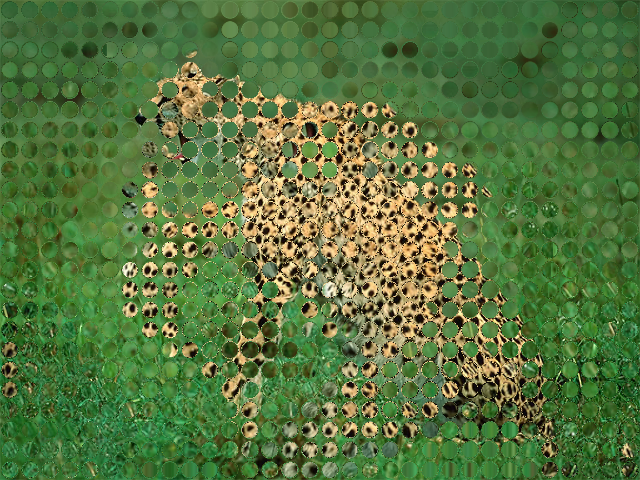
Demonstrate how to use [DirectionalDisplace].
|
|
|
|
The direction map is populated using `drawImage` instead of
|
|
pixel by pixel. A grid of circles is drawn, each circle with a
|
|
color based on simplex noise. The R and G channels of the colors
|
|
control the direction of the sampling. By animating the sampling
|
|
distance the result oscillates between no-effect and a noticeable one.
|
|
|
|
|
|
|
|
[source code](src/jvmDemo/kotlin/DemoDirectionalDisplace01.kt)
|
|
|
|
### DemoDirectionalDisplace02
|
|
|
|
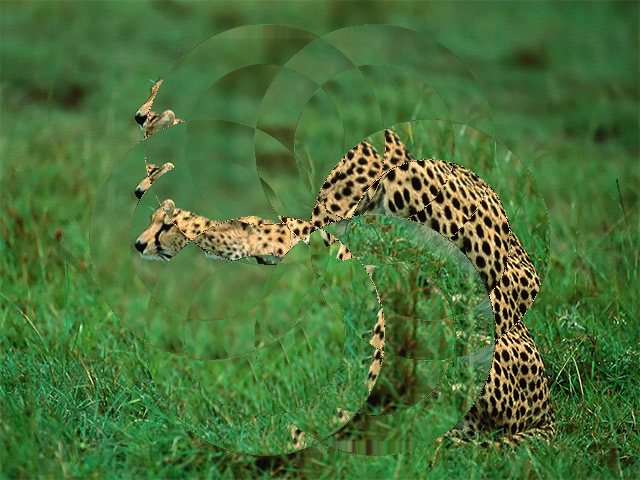
Demonstrate how to use [DirectionalDisplace].
|
|
|
|
The program draws 12 overlapping translucent circles on the
|
|
`direction` color buffer to produce new color combinations
|
|
on the overlapping areas. Those colors specify where the
|
|
`DirectionalDisplace` effect will sample pixels from.
|
|
|
|
|
|
|
|
[source code](src/jvmDemo/kotlin/DemoDirectionalDisplace02.kt)
|
|
|
|
### DemoDistortLenses01
|
|
|
|
Demonstrates the [Lenses] effect, which by default subdivides a color buffer
|
|
in 8 columns and 6 rows, and displaces the source texture inside each rectangle.
|
|
Try experimenting with some of the other parameters, like `distort`.
|
|
You can even animate them.
|
|
|
|

|
|
|
|
[source code](src/jvmDemo/kotlin/DemoDistortLenses01.kt)
|
|
|
|
### DemoDitherLumaHalftone01
|
|
|
|
Demonstrates the [LumaHalftone] effect and moste of its parameters.
|
|
The `invert` parameter toggles between true and false once per second.
|
|
The `phase0` and `phase1` parameters depend on `seconds`, which makes
|
|
the pattern wobble slowly.
|
|
|
|

|
|
|
|
[source code](src/jvmDemo/kotlin/DemoDitherLumaHalftone01.kt)
|
|
|
|
### DemoFluidDistort01
|
|
|
|
Demonstrates [FluidDistort], a fluid simulation real time effect.
|
|
All pixels are slowly displaced in a turbulent manner as if they were a gas or a liquid.
|
|
|
|

|
|
|
|
[source code](src/jvmDemo/kotlin/DemoFluidDistort01.kt)
|
|
|
|
### DemoOkLab01
|
|
|
|
This demonstrates converting a [ColorBuffer] from and to (OK)LAB color space using the [RgbToOkLab] and [OkLabToRgb]
|
|
filters. The (OK)Lab representation is signed and requires a floating point representation.
|
|
|
|

|
|
|
|
[source code](src/jvmDemo/kotlin/DemoOkLab01.kt)
|
|
|
|
### DemoPost01
|
|
|
|
Demonstrates how to create an `extend` block to apply a post-processing effect.
|
|
The effect is an [ApproximateGaussianBlur] and its `sigma` parameter
|
|
is animated. The Blur effect is combined with whatever the user draws
|
|
in the regular `extend` block using the `Add` filter, resulting in
|
|
an additive composition.
|
|
|
|
This demo also shows how to make a program window resizable.
|
|
|
|

|
|
|
|
[source code](src/jvmDemo/kotlin/DemoPost01.kt)
|
|
|
|
### DemoSpectralBlend01
|
|
|
|
Demonstration of how to use the [BlendSpectral] filter to combine two images, using
|
|
this pigment-simulation color mixing approach.
|
|
|
|
The program:
|
|
- generates two images
|
|
- blurs one of them
|
|
- creates and draws a checkers-pattern as the background
|
|
- mixes and draws both images
|
|
|
|
The `fill` factor, which controls how the top and the bottom colors are mixed, is animated.
|
|
|
|
The `clip` parameter is also animated and toggles every 6 seconds.
|
|
|
|

|
|
|
|
[source code](src/jvmDemo/kotlin/DemoSpectralBlend01.kt)
|